
Introspection: using extensions#
SAMSON has an open architecture that allows you to extend and adapt it to your needs by installing SAMSON Extensions from the SAMSON Connect website.
See also
User Guide: Extending SAMSON
SAMSON extensions can expose their functionality through the Introspection mechanism. Once exposed, you can access that functionality from both C++ and Python via proxies (SBProxy).
Tip
If you develop a SAMSON extension in C++ and want to use its functionality in Python scripts, then expose it via the Introspection mechanism on the C++ side.
See also
SAMSON SDK: Introspection
You can use the Exposed Functionality Viewer directly available in SAMSON (Home > Apps > Developer > Exposed functionality viewer) to see classes and functions exposed per extension. You can simply choose the extension, class, and function you are interested in and copy the generated sample code from the Python usage tab - you will only need to provide function arguments, if required.
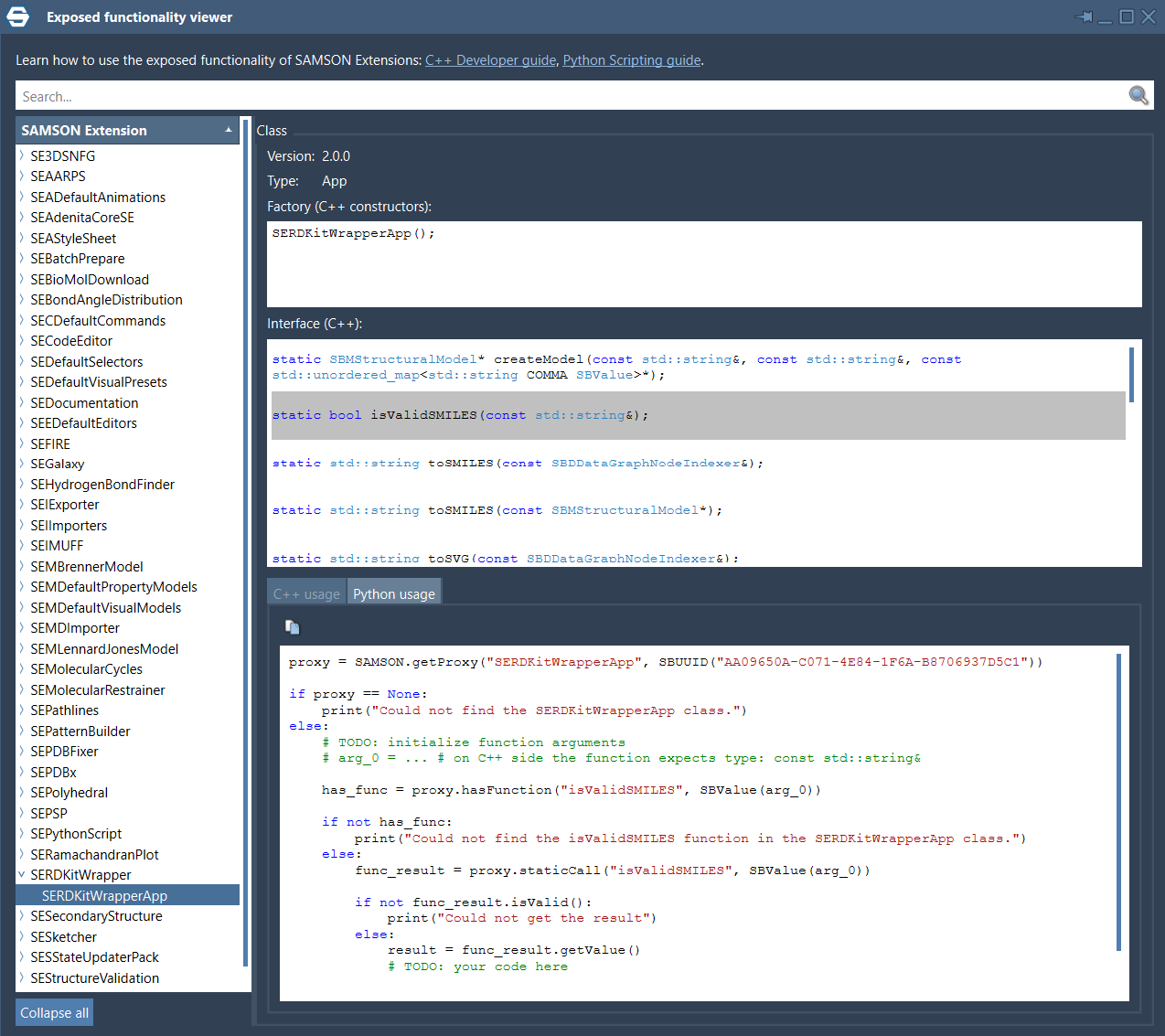
Getting proxies#
Exposed functionality is called through a class proxy (SBProxy). To get the proxy, you need to know at least the class name. If several SAMSON extensions may provide a class with the same name, specify the UUID of the extension as well.
proxy = SAMSON.getProxy(
    className = "SERDKitWrapperApp",
    extensionUUID = SBUUID("AA09650A-C071-4E84-1F6A-B8706937D5C1"))
Calling functions#
Proxies can expose various types of functions:
Function type |
How to call |
|---|---|
static |
|
non-static |
|
non-static const |
Calling static functions#
# get the class proxy
proxy = SAMSON.getProxy(
    className = "SERDKitWrapperApp",
    extensionUUID = SBUUID("AA09650A-C071-4E84-1F6A-B8706937D5C1"))

# check if the proxy has the exposed function `isValidSMARTS` that accepts a string
if proxy.hasFunction("isValidSMARTS", SBValue("")):

    # call the static function for a given SMARTS
    # the call will return a resulting value encapsulated into `SBValue` object
    result = proxy.staticCall(
        # function name
        "isValidSMARTS",
        # function arguments
        SBValue("CCO"))

    # check if the returned `SBValue` is valid
    if result.isValid():
        # get the value from the `SBValue` object
        print("result: ", result.getValue())
Calling non-static functions#
To call a non-static function, you need to create the corresponding class instance. The class instance is created from its proxy via SBProxy.createInstance() which returns the newly created instance as SBValue.
Note
The ownership of the class instance object is taken and managed by Python.
The code below shows how to call a non-static function using a created instance of the corresponding class on an example of the Fetcher extension that exposes the functionality to fetch/download PDB files.
import os

# get the class proxy
proxy = SAMSON.getProxy(
    className = "PDBDownload",
    extensionUUID = SBUUID("6F5D45C5-E76E-CDC8-52D5-D2821C128BE8"))

## create the class instance from its proxy
instance = proxy.createInstance()

# check if the instance has been successfully created
if instance.isValid():

    # check if the class proxy has the desired function
    if proxy.hasFunction("downloadOnly", SBValue(""), SBValue(""), SBValue("")):

        # call a non-static function for the class instance
        # this function will download and save the PDB file in the default directory
        proxy.call(
            # class instance
            instance,
            # function name
            "downloadOnly",
            # function arguments
            SBValue("1YRF"), SBValue("pdb"), SBValue(""))

        # the default path to the destination file
        downloaded_file_path = SAMSON.getUserDataPath() + "/Downloads/PDB/1YRF.pdb"

        # check if the file has been downloaded
        if os.path.exists(downloaded_file_path):
            print("Downloaded successfully")
        else:
            print("Could not download a file")
In the same way you can call non-static const functions.